
OpenIddict and IdentitySuite
Secure configuration without the complexity
In the previous article, we looked at the most common mistakes developers make when configuring OpenIddict from scratch — development certificates in production, token lifetimes left at defaults, missing PKCE enforcement, loose redirect URI validation, and no revocation strategy. Each one is a real vulnerability, not just a best practice to follow when convenient.
In this article, we close the loop. Every one of those pitfalls has a specific answer in IdentitySuite — and in most cases, that answer requires no code at all.
Certificates — persistent, managed, monitored
The pitfall: development certificates are ephemeral. Every restart invalidates all active tokens, and they are not suitable for production under any circumstances.
IdentitySuite handles certificate management as a first-class concern, with two distinct modes depending on your deployment requirements.
Built-in certificates are the default mode. IdentitySuite generates RSA 4096 self-signed certificates automatically and manages their entire lifecycle — creation, storage, and rotation — without any manual intervention. When a certificate approaches expiry, the system rotates it automatically and keeps the previous certificate available for long enough to cover all tokens that were issued with it. No expired token is invalidated prematurely.
While self-signed certificates are not the recommended choice for high-compliance environments, they are a legitimate option for production — RSA 4096 provides strong cryptographic guarantees, and the fully automated lifecycle removes the operational risk of forgetting a manual rotation.
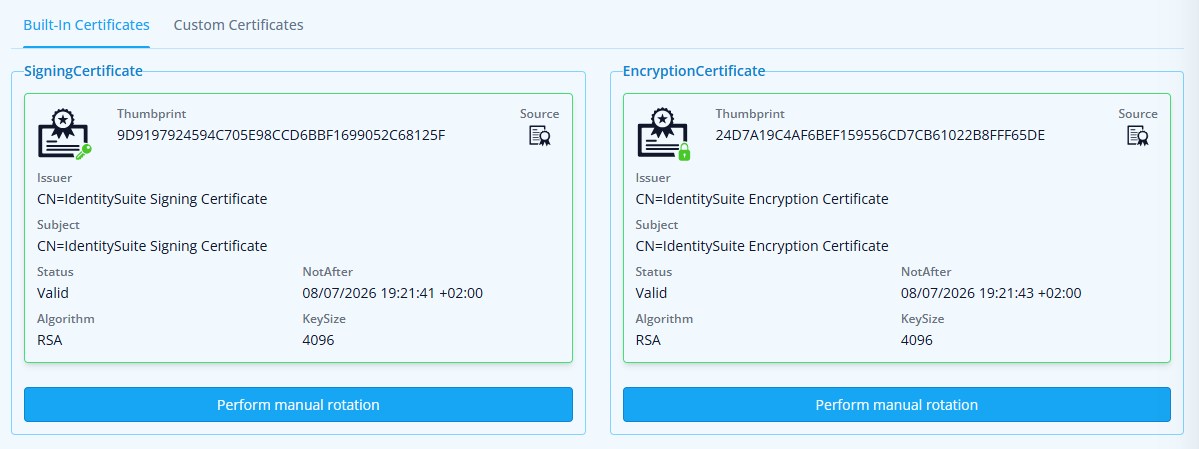
Built-in certificates configuration in the IdentitySuite admin panel
Custom certificates allow you to load your own certificates — from the filesystem or from the certificate store on systems that support it. This is the recommended path when your security policy requires certificates issued by a trusted CA or managed through your organization's PKI. In this mode, rotation is manual: you upload the new certificate when needed, and IdentitySuite handles the transition, keeping the previous certificate active until all tokens signed with it have expired.
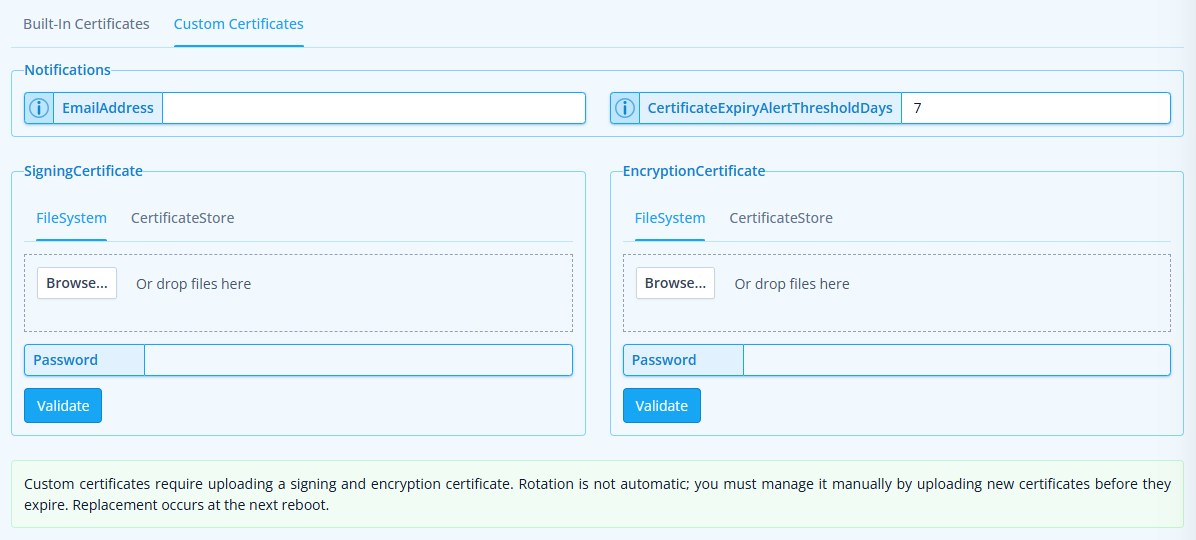
Custom certificates configuration in the IdentitySuite admin panel
In both modes, the Dashboard displays the expiry status of signing and encryption certificates in real time, with visual warnings when rotation is approaching. No scripts to write, no external monitoring to set up — the system surfaces the information where it is needed.
💡 What this means in practice
Certificates survive application restarts and are consistent across all instances of your deployment. In a load-balanced environment, every node uses the same certificate — tokens issued by one instance are valid on all others. And regardless of the rotation mode, no active token is ever invalidated early due to a certificate change.
Token lifetimes — explicit, configurable, visible
The pitfall: leaving token lifetimes at framework defaults means access tokens that are valid far longer than necessary, with no easy way to adjust them without touching code.
In IdentitySuite, every token lifetime is configurable from the admin UI. Access tokens, refresh tokens, authorization codes, identity tokens, device codes — each has its own field, with the current value always visible.
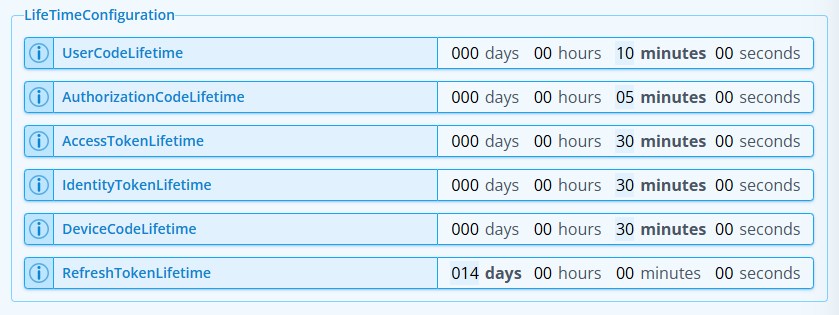
Token lifetime settings in the IdentitySuite admin panel
The defaults IdentitySuite ships with are deliberately conservative — short access token lifetimes, reasonable refresh token windows. You can adjust them at any time without a redeployment. Since token lifetimes are read at startup, changes take effect after the next process recycle — which in most hosting environments means a few seconds.
PKCE — enforced at the server level
The pitfall: OpenIddict supports PKCE but does not enforce it by default. A single missing method call leaves public clients vulnerable to authorization code interception.
IdentitySuite enforces PKCE at the server level for all authorization code flows by default — the configuration is applied globally and consistently, regardless of how individual clients are registered. For most deployments, this is the right choice and requires no additional setup.
If your scenario requires more flexibility — for example, when integrating legacy clients that do not support PKCE — the enforcement can be disabled through a configuration option. The default, however, is always the secure one: PKCE on, protection active from the first request.
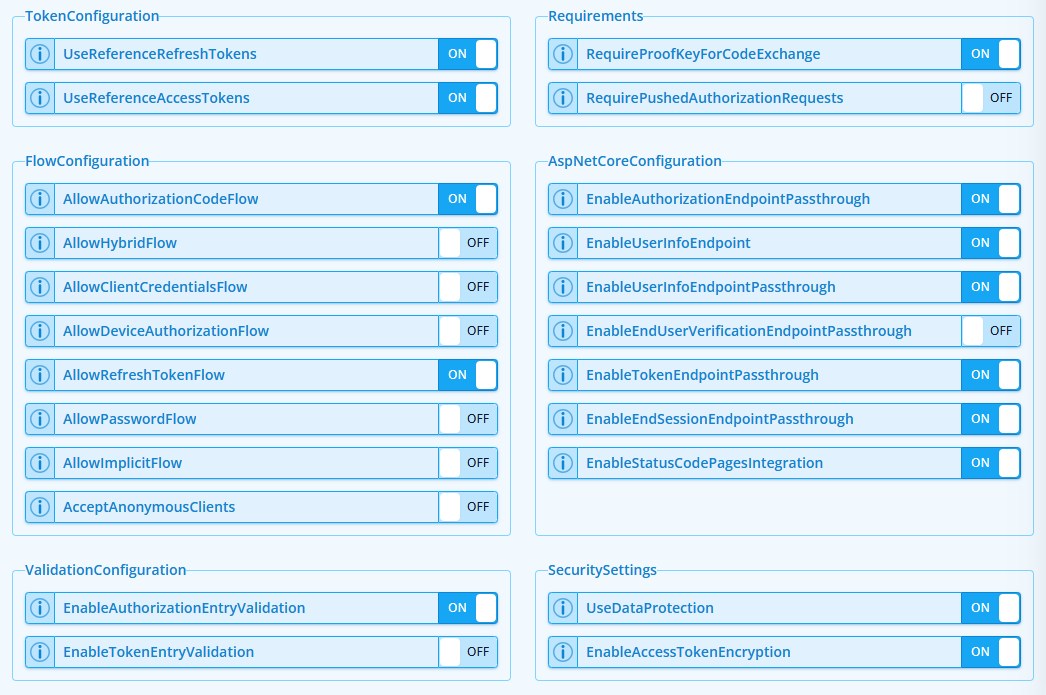
PKCE enforcement at the server level — applied globally to all authorization code flows
The same requirement is visible and verifiable at the individual client level, so you always know exactly what security constraints apply to each registered application — without having to cross-reference multiple configuration files.
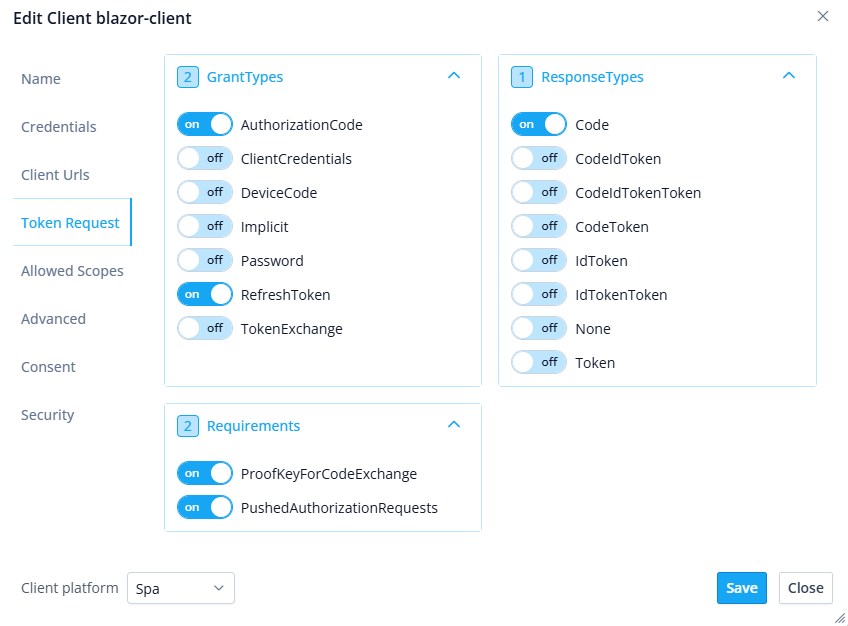
PKCE requirement visible and verifiable at the individual client level
Redirect URIs — exact matching, no exceptions
The pitfall: registering redirect URIs that are too broad, or accepting wildcards and pattern matching, creates open redirect vulnerabilities that can be exploited to capture authorization codes.
In IdentitySuite, redirect URIs are registered per client through the admin interface. The validation model enforces exact URI matching — what you register is exactly what will be accepted, nothing more. There are no wildcards, no path prefixes, no pattern matching.
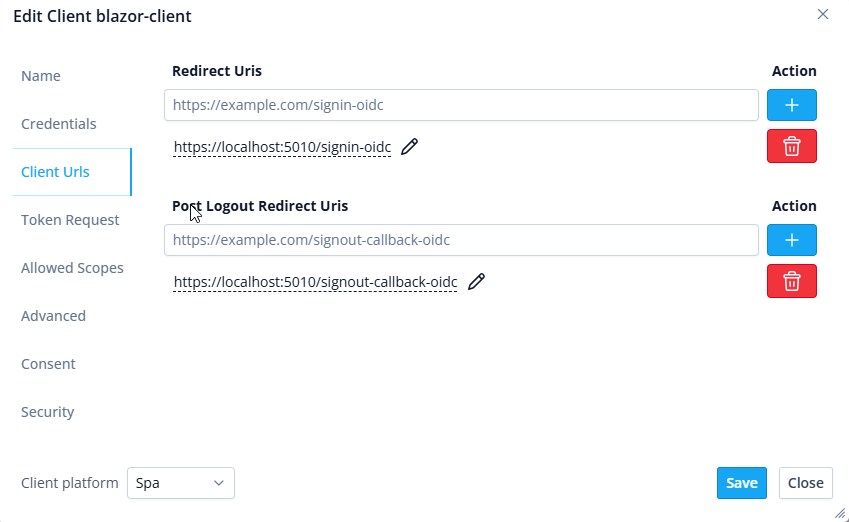
Redirect URI registration for a client in the IdentitySuite admin panel
Adding or removing redirect URIs requires no code changes and no redeployment. Client configurations are stored in the database and take effect immediately, which is particularly useful during onboarding of new client applications.
Scopes and audiences — consistent by design
The pitfall: in a raw OpenIddict setup, scopes and audiences must be configured consistently across three separate places — the server registration, the API resource definitions, and each client registration. A mismatch at any point produces tokens that either fail validation or grant access they should not.
IdentitySuite structures this as a clear hierarchy. At the server level, you define which scopes are globally available. Each API scope is then associated with one or more API resources — the actual services that will validate tokens. Finally, each client declares exactly which identity scopes and API scopes it is allowed to request.
Because every level references the one above it, the configuration is always coherent end-to-end. There is no way to assign a scope to a client that has not been defined at the server level, and no way for a token to reach an API resource it was not intended for.
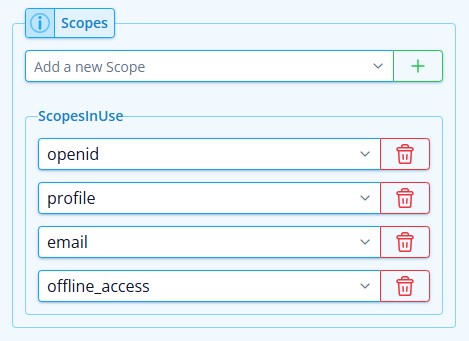
Scopes defined at the server level
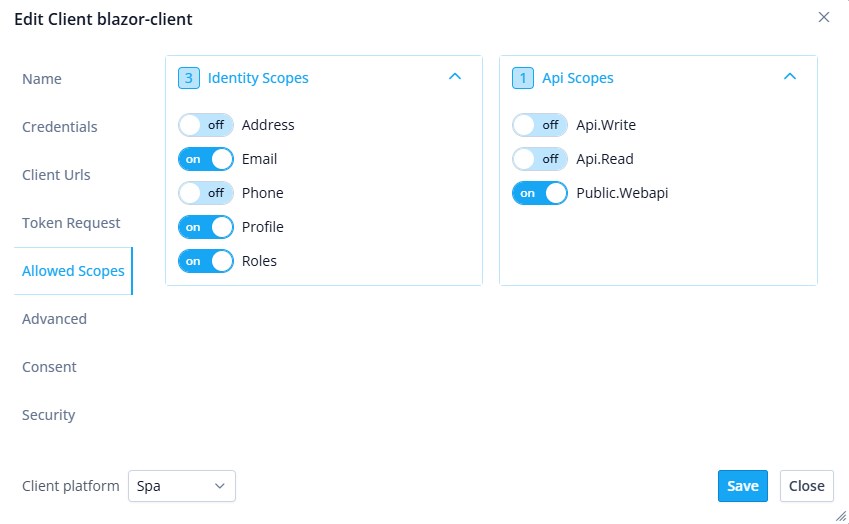
Scopes assigned to an individual client
💡 Why this matters
Scope and audience misconfiguration is one of the most common sources of frustration when setting up an authorization server from scratch. IdentitySuite resolves it structurally — the hierarchy enforces consistency, so there is no configuration to get wrong.
Token revocation — available when you need it most
The pitfall: skipping token revocation means that in the event of a security incident, compromised tokens remain valid until they naturally expire — with no way to stop them.
IdentitySuite includes a token revocation system built directly into the Dashboard. A single action revokes all active tokens across all clients — useful in emergency scenarios such as a suspected credential leak or a Data Protection key rotation.
Per-client revocation is also available, allowing you to terminate all sessions for a specific application without affecting others. Both actions are audited, so there is always a record of when revocation happened and who triggered it.
⚠️ Emergency revocation
When you revoke all tokens alongside a Data Protection key rotation, IdentitySuite handles the post-revocation session cleanup automatically — including the antiforgery cookie invalidation that would otherwise leave the admin UI in a broken state.
What you actually write
To put this in perspective: getting OpenIddict to a production-ready state from scratch requires writing and maintaining a significant amount of security-critical configuration code. Certificates, lifetimes, PKCE enforcement, redirect URI validation, scope definitions, revocation endpoints — each one is a decision point where a mistake has consequences.
With IdentitySuite, your Program.cs looks like this:
var builder = WebApplication.CreateBuilder(args);
builder.AddIdentitySuiteServices();

var app = builder.Build();
await app.SetupIdentitySuiteDbAsync();
app.UseIdentitySuiteServices();
app.Run();
Everything covered in this series — certificates, token lifetimes, PKCE, redirect URIs, scopes, audiences, revocation — is handled internally by those three method calls. The design philosophy is deliberate: ship with secure, production-ready defaults so you can get a working, secure environment up and running immediately, without writing a single line of security-critical code.
At the same time, the system remains highly configurable. All the settings discussed in this article are manageable through the admin UI at runtime — no code changes, no configuration file edits required. For teams that need deeper customization, a full set of options is available to tailor every aspect of the system to their specific requirements.
Wrapping up the series
Over three articles, we have covered what OpenIddict is, where its configuration complexity lies, and how IdentitySuite addresses each of those points in a structured and auditable way.
If you are building a .NET application that needs OAuth 2.0 or OpenID Connect, and you want the reliability of OpenIddict without the configuration surface, IdentitySuite is worth a look.

About IdentitySuite
IdentitySuite simplifies enterprise authentication for .NET developers. Built on proven technologies like ASP.NET Core Identity and Openiddict, we eliminate the complexity of OAuth 2.0 and OpenID Connect implementation while maintaining enterprise-grade security standards.